

In an era where remote work and virtual learning have become the norm, the demand for desktop computers has surged. While laptops offer portability, desktop PCs provide unparalleled versatility and performance, thanks to their easily upgradable components. Fortunately, for those seeking convenience, there's a plethora of pre-built desktop options available in the market.
Despite the sleek designs and capabilities of best laptops and smartphones, desktop PCs are still holding their ground. They might seem like relics from the '80s to some, but trust me, they're far from extinct. In fact, innovation is alive and well in the desktop market, with small-form-factor and all-in-one models pushing the boundaries of what's possible.
How we checked everything else: We cross-checked each entry's prose against its own pros/cons box, checked CPU and GPU naming for accuracy and precision, and flagged entries where a gaming-relevant spec (usually the GPU model) was missing or too vague to compare against other entries. Disclosure: This article contains affiliate links. If you buy through them, NoypiGeek may earn a small commission at no extra cost to you. This doesn't affect which products we recommend or how we rank them.
Table of Contents
Quick Verdict: Best Desktop Computers at a Glance
Buying Guide: How to Pick a Desktop Computer
10 Best Desktop Computers in the Philippines: Top Picks for Power and Performance
1. Apple iMac 24-inch
2. Lenovo Legion Tower 7
3. Apple Mac Mini M4
4. ASUS Mini PC NUC12WSHI5
5. Dell Inspiron 3020 Desktop
6. Ipason PC Meow
7. Xitrix GL1R Gaming PC
8. Machenike Mini PC GTX
9. MSI Cubi 5 12M
10. PROVISION Desktop Computer
FAQs
Conclusion
Quick Verdict: Best Desktop Computers at a Glance
Two entries — the Xitrix GL1R and Machenike Mini PC GTX — aren't included in the gaming badge below, since neither specifies which actual GPU model you're getting. See their entries for what to confirm before buying either.
🏆 BEST OVERALL
Apple iMac 24-inch
The M4 chip, a 4.5K Retina display, and full peripherals built into one polished, all-in-one package.
💰 BEST VALUE
Machenike Mini PC GTX
A genuinely current Ryzen 7 8845HS with 16GB DDR5 RAM and a 1TB PCIe 4.0 SSD, in a compact footprint — though confirm the exact GPU before buying.
🎮 BEST FOR GAMING
Ipason PC Meow
The only gaming desktop on this list with both CPU and GPU specifically named and confirmed: i5-13500KF and RTX 4060Ti.
💼 BEST FOR PRODUCTIVITY/OFFICE
Dell Inspiron 3020 Desktop
Ships with a monitor, keyboard, mouse, and pre-installed MS Office — a complete, ready-to-use setup out of the box.
🖥️ BEST COMPACT/ALL-IN-ONE
Apple Mac Mini M4
A genuinely tiny footprint without sacrificing real performance — the most space-efficient pick here.
🔧 BEST UPGRADABILITY
Lenovo Legion Tower 7
A full-size tower with genuine room to grow — unlike the mini PCs and all-in-ones elsewhere on this list, most of which explicitly can't be upgraded later.
🏷️ BEST BUDGET
MSI Cubi 5 12M
₱17,499–19,499 — the cheapest desktop on this list, with a confirmed 12th Gen Intel Core i3 for everyday tasks.
Buying Guide: How to Pick a Desktop Computer
Decide how much you value upgradability before you buy a compact form factor. Mini PCs and all-in-ones (Mac Mini, ASUS NUC, MSI Cubi, iMac) are genuinely space-efficient, but several explicitly can't be upgraded after purchase — the Mac Mini's cons box says so directly, and the Machenike Mini PC GTX's does too. If you want to add RAM or storage down the line, a full tower like the Lenovo Legion Tower 7 or a configurable option like the PROVISION Desktop gives you that room; a mini PC generally doesn't.
GPU model precision matters for gaming desktops just as much as it does for gaming laptops. Two entries here — the Xitrix GL1R ("GTX or RTX GPU options," no model named) and the Machenike Mini PC GTX ("GTX GPU," also no model) — don't specify which actual graphics card you're getting. That's a meaningful gap; "GTX" alone covers everything from years-old budget cards to models several tiers apart in performance. Confirm the exact GPU model before buying either.
Bundled peripherals can be a real value factor, not just a nice-to-have. The Dell Inspiron 3020 includes a monitor, keyboard, and mouse in its price — factor that into any price comparison against desktops sold as tower-only, since you'd need to budget separately for those with most other entries here.
Confirm whether an operating system is included. The Machenike Mini PC GTX's cons box specifically notes no pre-installed OS — budget for a Windows license (or plan to install Linux) on top of the listed price if you go with that one.
Who should buy in this tier: home users, students, and light-to-moderate gamers who want either desk-space efficiency (mini PCs, all-in-ones) or long-term upgrade flexibility (towers). Who should look elsewhere: serious gamers who need a specific, high-tier GPU — confirm the exact model on the Xitrix and Machenike entries before assuming either meets that bar.
Common mistake: assuming a mini PC or all-in-one can be upgraded the way a tower can — as several entries here make clear, that's often explicitly not the case.
10 Best Desktop Computers in the Philippines: Top Picks for Power and Performance
Believe it or not, desktop PCs are still a fantastic choice, offering both affordability and customization options. In this article, we'll delve into the top 10 desktop computers available in the Philippines, highlighting what makes each one special — with the spec and content issues we found flagged along the way.
1. Apple iMac 24-inch
.webp "Apple iMac 24-inch")
- Sleek, compact design
- Stunning Retina display
- Powerful performance
- Smooth Apple ecosystem integration
- Limited storage for the base model
- Higher price compared to other desktop PCs
If you're after a desktop that combines cutting-edge performance with iconic design, the Apple iMac 24-inch is an unbeatable choice. Equipped with the Apple M4 chip, this desktop brings lightning-fast speed and efficiency, whether you're editing videos, designing graphics, or simply browsing the web. The stunning 24-inch Retina 4.5K display delivers vivid colors and sharp details, making it perfect for creative professionals and entertainment enthusiasts alike. It comes with the current version of macOS, offering smooth integration with all Apple devices, including iPhones and iPads.
Moreover, the iMac is more than just a powerhouse; it's a masterpiece in design. Its ultra-slim, vibrant chassis elevates any desk setup, while features like studio-quality microphones, a six-speaker sound system, and Touch ID make it a joy to use daily. Though its 256GB storage may seem limiting for heavy users, external storage solutions easily address this concern. So, if you're deeply invested in the Apple ecosystem or crave unparalleled quality, the iMac 24-inch is worth every peso.
Who should buy it: Apple ecosystem users who want a polished all-in-one with no separate monitor or peripherals to source. Verdict: the most complete, no-compromise all-in-one on this list — confirm the current macOS version on checkout, but the hardware case is strong.
2. Lenovo Legion Tower 7

- Robust build quality
- Excellent cooling system
- Excellent gaming performance
- Customizable RGB lighting
- A bit bulky design
- Needs more I/O
Lenovo has built a strong reputation for producing reliable and innovative technology, from business laptops to high-performance gaming machines. The Legion Tower 7 continues this legacy as a gaming-oriented tower designed for enthusiasts, and its advanced cooling system keeps performance stable even during marathon gaming sessions. Whether you're a casual player or a competitive gamer, the full-tower form factor ensures room for airflow and future component swaps.
What genuinely sets this entry apart from the mini PCs and all-in-ones elsewhere on this list is upgrade room — its full-size chassis is built to accept new components as your needs grow, unlike the Mac Mini, ASUS NUC, or MSI Cubi, all of which explicitly limit post-purchase upgrades. That said, confirm the exact CPU and GPU before buying given the vague spec language and price point noted above.
Who should buy it: buyers who want a full-tower form factor with genuine upgrade room, and who confirm the exact CPU/GPU configuration before buying given how vague this entry's specs are. Verdict: the upgradability pick on this list — just don't buy on the "Legion Tower 7" name alone without checking the actual configuration.
3. Apple Mac Mini M4

- Compact, space-saving design
- Impressive performance
- Quiet, energy-efficient
- Good connectivity
- No internal upgrades
- Inconvenient power button
Apple has long been known for its innovation and sleek design, and the Mac Mini M4 is no exception. This compact desktop packs a punch with the powerful Apple M4 chip, making it a capable machine for everyday productivity, multitasking, and even light creative work. Its small footprint makes it ideal for those with limited desk space, while still delivering the speed and efficiency Apple users expect. Despite its size, it stays cool and quiet even under heavy workloads, ensuring a smooth and uninterrupted experience.
The cons box's honest "no internal upgrades" is a real trade-off for the compact form factor — worth comparing directly against the Lenovo Legion Tower 7's genuine upgrade room above if longevity matters more to you than desk space. It supports multiple displays, making it a solid choice for professionals who need a more expansive workspace despite the tiny chassis.
Who should buy it: Apple ecosystem users with limited desk space who don't need internal upgrade options. Verdict: the most space-efficient desktop on this list — just supply your own display and peripherals, and don't buy expecting to upgrade it later.
4. ASUS Mini PC NUC12WSHI5

- Ultra-compact design
- Great performance
- Great port selection
- Upgradeable RAM and storage
- Limited gaming capabilities
- Better dust filtering would be nice
The NUC name here is legitimate — Intel sold its NUC business to ASUS in 2023, and ASUS has continued the line under license, so "ASUS NUC" isn't a naming error. Equipped with a confirmed Intel Core i5-1240P processor and Intel Iris Xe Graphics, it handles multitasking, office applications, and media playback with ease. Its 16GB of RAM and 512GB SSD ensure fast performance and ample storage.
Unlike the Mac Mini and Machenike Mini PC GTX elsewhere on this list, the pros box specifically calls out upgradeable RAM and storage — a genuine advantage for a mini PC form factor, worth weighing against the Mac Mini if you want compact size without fully giving up future flexibility. As the cons box notes, it's not built for gaming — Iris Xe integrated graphics handle office and media tasks well but nothing more demanding.
Who should buy it: students and professionals who want a compact desktop with some future upgrade room, and don't need gaming performance. Verdict: the rare mini PC on this list that doesn't fully sacrifice upgradability for size.
5. Dell Inspiron 3020 Desktop

- Budget friendly price
- Great overall performance
- Includes free monitor, keyboard, and mouse
- Two-year warranty and pre-installed MS Office
- Basic design without RGB
- Limited graphics capabilities
The Dell Inspiron 3020 Desktop is a budget-friendly choice designed for students, professionals, and small business owners who need reliable everyday performance. Powered by Intel's 13th Gen processors (exact model not specified — confirm on the listing), it handles multitasking with ease. The combination of an SSD and HDD provides both speed and ample storage, making it a practical option for those who need efficiency without compromise.
The real standout here isn't the CPU — it's what's included: a Dell SE2422 monitor, keyboard, mouse, a two-year warranty, and pre-installed MS Office, all at ₱35,990. None of the other nine desktops on this list bundle a monitor and full peripheral set, so factor that into any price comparison; buying a bare tower elsewhere and sourcing your own monitor and peripherals could easily cost more in total.
Who should buy it: anyone who wants a complete, ready-to-use setup out of the box without sourcing a monitor or peripherals separately. Verdict: the best true out-of-box value on this list once you account for what's actually included.
6. Ipason PC Meow

- Modern, stylish design
- Outstanding gaming performance
- Large RAM and storage capacity
- Efficient cooling system
- Premium price tag
- May be overkill for casual users
The Ipason PC Meow is the only gaming desktop on this entire list with both its CPU and GPU specifically confirmed: an Intel Core i5-13500KF paired with an NVIDIA RTX 4060Ti. That specificity matters — the Xitrix GL1R and Machenike Mini PC GTX elsewhere on this list both leave their GPU unnamed, making direct comparison difficult. The 1TB SSD and DDR5 RAM round out a genuinely capable gaming build, though the exact RAM capacity isn't stated — worth confirming before buying.
An advanced cooling system and customizable RGB lighting round out a package built for sustained gaming sessions rather than short bursts, and the "premium price tag" cons callout is a fair, honest framing rather than a hidden surprise.
Who should buy it: gamers who want a confirmed, specific GPU tier and are willing to pay for it, and who confirm the exact RAM capacity before buying. Verdict: the clearest, most specifically documented gaming desktop on this list.
7. Xitrix GL1R Gaming PC

- Solid build quality
- Impressive gaming performance
- Excellent cooling system
- Customizable RGB lighting
- Noisy fans
- Requires additional peripherals
The Xitrix GL1R's confirmed details are solid: 16GB of RAM for seamless multitasking, a 500GB SSD for quick loading, and a 120mm RGB AIO liquid cooling system built to handle marathon gaming sessions. The cons box's honest "requires additional peripherals" is worth budgeting for — unlike the Dell Inspiron 3020 above, this is a tower-only purchase.
The system does offer real room for future upgrades, per the prose, which is a genuine advantage of the tower form factor shared with the Lenovo Legion Tower 7 elsewhere on this list. Just don't commit to buying based on the "GTX or RTX" framing alone — that phrase alone doesn't tell you what you're actually getting.
Who should buy it: budget-conscious gamers who confirm the exact CPU and GPU model directly with the seller before buying, and who budget for a separate monitor and peripherals. Verdict: potentially good value — but the vaguest gaming spec sheet on this list makes it impossible to confirm from the write-up alone.
8. Machenike Mini PC GTX

- Compact, portable design
- High-performance processor
- Generous SSD storage
- Good connectivity
- Limited upgradability
- No pre-installed operating system
The Machenike Mini PC GTX's CPU and memory configuration is genuinely strong for its size: the Ryzen 7 8845HS with 16GB of DDR5 RAM and a 1TB PCIe 4.0 SSD, all in a compact, space-saving chassis with Wi-Fi 6 for reliable connectivity. That's a real step up in raw compute over the MSI Cubi or ASUS NUC elsewhere on this list.
Two honest cons worth planning around: limited upgradability (consistent with the compact form factor, similar to the Mac Mini) and no pre-installed operating system — budget for a Windows license, or plan to install Linux, on top of the listed price.
Who should buy it: buyers who want strong CPU performance in a compact chassis and are comfortable sourcing their own OS and confirming the exact GPU before buying. Verdict: a strong CPU-and-storage value, undercut by a genuinely ambiguous GPU claim worth resolving before checkout.
9. MSI Cubi 5 12M

- Sturdy build
- Space-saving design
- Affordable price point
- Reliable performance for basic tasks
- Not suitable for high-end gaming
- Limited hardware upgrade options
MSI, a renowned brand known for its innovative and reliable tech solutions, brings versatility and performance to the forefront with the MSI Cubi 5 12M. This mini PC is powered by a confirmed Intel Core i3-1215U processor — the "12" in the model name correctly signals its 12th Gen platform, a good sign of accurate naming here — delivering dependable performance for everyday tasks like web browsing, video streaming, and office applications.
At ₱17,499–19,499, this is the cheapest desktop on the entire list, undercutting even the ASUS NUC by roughly ₱4,000–6,000. Wi-Fi AX211 ensures fast, stable connectivity, and multiple USB ports plus HDMI cover typical peripheral needs. Just confirm RAM and storage directly with the seller given the gap noted above.
Who should buy it: budget-conscious buyers who need a compact, everyday-use desktop and confirm RAM/storage before buying. Verdict: the cheapest desktop on this list — just fill in the missing RAM and storage specs before committing.
10. PROVISION Desktop Computer
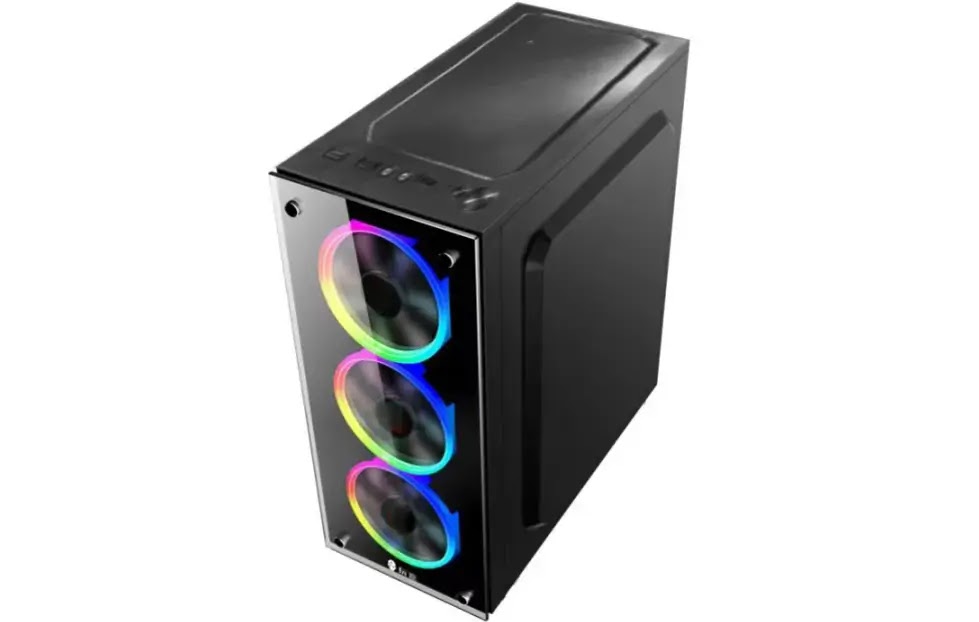
- Attractive design
- Affordable and durable
- RGB cooling fans
- Customizable configurations
- Not ideal heavy gaming
- Limited storage
Wrapping up our list is the PROVISION Desktop Computer, a versatile and budget-friendly option for home, office, or gaming. With customizable configurations, it offers multiple processor choices, including Intel Core i7-12700, i5-12400, and i3-12100 — all real, correctly named 12th Gen chips, giving buyers a genuine choice depending on budget and performance needs. The flexibility extends to RAM and SSD options as well, though exact figures depend on which configuration you select.
Whether you need a dependable machine for office tasks or a capable system for light gaming, the PROVISION Desktop delivers solid value at ₱21,499 — the second-cheapest entry on this list after the MSI Cubi. The RGB cooling fans add a stylish touch, and the option to configure your own processor tier up front is a genuine advantage over fixed-spec entries elsewhere on this list.
Who should buy it: buyers who want to choose their own CPU tier up front rather than accept a fixed configuration. Verdict: a flexible, affordable option — just confirm the RAM/storage figures for whichever configuration you actually select.
FAQs
Should I buy a mini PC/all-in-one or a full tower?
Depends on whether you value desk space or upgrade room more. Mini PCs and all-in-ones (Mac Mini, ASUS NUC, MSI Cubi, iMac) save real desk space but several — the Mac Mini and Machenike Mini PC GTX explicitly — can't be meaningfully upgraded later. Full towers like the Lenovo Legion Tower 7 or configurable options like the PROVISION Desktop take up more room but let you add RAM, storage, or a new GPU down the line.
Which desktop on this list is best for gaming?
The Ipason PC Meow, with a confirmed Intel Core i5-13500KF and RTX 4060Ti. It's the only gaming-oriented desktop here with both CPU and GPU specifically named — the Xitrix GL1R and Machenike Mini PC GTX both leave their GPU model unconfirmed, so treat those as needing verification before comparing them directly against the Ipason.
Does a desktop come with a monitor, keyboard, and mouse?
Not usually — only the Dell Inspiron 3020 on this list bundles a monitor and peripherals in its listed price. Every other entry here is sold as a standalone unit (tower, mini PC, or all-in-one with built-in display for the iMac), so budget separately for a monitor, keyboard, and mouse if you go with any of the others.
What should I check before buying a compact desktop or mini PC?
Whether it includes an operating system (the Machenike Mini PC GTX explicitly doesn't), whether RAM and storage are upgradeable later (the ASUS NUC and Lenovo Legion Tower 7 offer this; several others don't), and — for anything marketed for gaming — the exact GPU model rather than a vague "GTX or RTX" descriptor.
Where can I buy desktop computers in the Philippines?
Lazada and Shopee are the marketplaces linked throughout this list, and prices between them can differ — the Machenike Mini PC GTX, for example, is about ₱3,500 cheaper on Shopee than Lazada. Physical retailers like PC Express, SM Appliance, and Abenson are also worth checking, especially for configurable builds like the PROVISION Desktop.
Conclusion
Choosing the right desktop comes down to how you'll actually use it: the Apple iMac 24-inch is the most complete all-in-one if you're in the Apple ecosystem and budget allows, the Ipason PC Meow is the clearest choice for gaming since it's the only entry here with a fully confirmed CPU and GPU, and the MSI Cubi 5 12M is the cheapest way to get a dependable desktop for everyday tasks. If upgrade room matters most, look at the Lenovo Legion Tower 7 or PROVISION Desktop over any of the mini PCs or all-in-ones, several of which explicitly can't be expanded later. Before buying the Xitrix GL1R or Machenike Mini PC GTX specifically, confirm the exact GPU model directly with the seller — neither write-up names one, and that's the single biggest factor in what either machine can actually do.




0 Comments