

Are you tired of hunching over your laptop all day, feeling that literal pain in your neck and shoulders? Well, there's good news: laptop stands can save the day! These nifty accessories raise your screen to eye level, making it way comfier to sit up straight at your desk. Once you try it, you'll wonder why you didn't sooner!
Living in the Philippines means we're no strangers to remote work and online classes. That's why finding the perfect laptop stand is crucial for staying comfy and productive. Lucky for you, we rounded up the best laptop stands available in the country. These stands are sturdy, versatile, and designed with your comfort in mind, so you can kiss those aches and pains goodbye — with one gap worth knowing before you buy: none of these listings have a price attached, so you'll need to check the live listing yourself.
Table of Contents
Quick Verdict: Best Laptop Stands at a Glance
Buying Guide: How to Pick a Laptop Stand
Top 10 Laptop Stands in the Philippines for Ultimate Comfort and Productivity
1. Nexstand K2
2. Stance Hover Laptop Stand
3. True Vision Foldable Aluminum Laptop Riser
4. MOFT Laptop Stand
5. Nillkin ProDesk Adjustable Stand
6. Monsy Laptop Stand
7. Griffin Elevator Laptop Stand
8. Wanderskye Laptop Sleeve with Stand
9. UGreen X-Kit
10. Lention Laptop Stand
FAQs
Conclusion
Quick Verdict: Best Laptop Stands at a Glance
🏆 BEST OVERALL
Nexstand K2
8 height settings, a confirmed 9kg weight rating, and genuine portability under a pound — verified against the manufacturer's own specs.
🧳 MOST TRAVEL-FRIENDLY
MOFT Laptop Stand
Just 3mm thick and sticks directly to your laptop — the only entry on this list that adds zero bulk to your bag.
🔌 BEST FOR CONNECTIVITY
UGreen X-Kit
A built-in USB-C hub with USB-A, HDMI, and SD/TF card slots — the only stand on this list that doubles as a dock.
🎥 BEST FOR VIDEO CALLS
Griffin Elevator Laptop Stand
A 5.5-inch lift specifically built to fix unflattering webcam angles — though you'll want a separate keyboard and mouse at that height.
⚙️ MOST ADJUSTABLE
Nillkin ProDesk Adjustable Stand
Independent height and tilt adjustment, flexible enough for both seated and standing-desk use.
🎒 BEST 2-IN-1
Wanderskye Laptop Sleeve with Stand
A water-resistant sleeve that folds into a stand — the only entry on this list that replaces your laptop bag, not just your desk setup.
🏷️ BEST BUDGET
Monsy Laptop Stand
An aluminum alloy build with adjustable width and anti-slip pads, positioned as this list's straightforward value pick.
Buying Guide: How to Pick a Laptop Stand
Decide between a portable stand and a desk-permanent one first. Ultra-thin, travel-friendly options like the MOFT or Wanderskye sleeve are built to go in a bag every day. Sturdier, more adjustable stands like the Nillkin ProDesk or UGreen X-Kit are better suited to living on one desk permanently. Trying to use a travel stand as your only home setup, or vice versa, usually means compromising on the thing that stand does best.
If you'll be raising your laptop significantly, plan for a separate keyboard and mouse. The Griffin Elevator's 5.5-inch lift is great for webcam angle and posture, but typing directly on a laptop raised that high gets awkward fast — the article itself flags this. Any stand that lifts your screen well above typing height benefits from a wireless keyboard and mouse alongside it.
Check the weight capacity against your actual laptop, not just "does it look sturdy." The Nexstand K2's 9kg rating (confirmed by the manufacturer) is well above what any single laptop weighs, so it's a non-issue there — but not every stand states a clear number. When one isn't stated, it's worth asking the seller directly, especially for larger 17-inch gaming laptops.
Treat vague "rave reviews" language as marketing, not a spec. A claim like "getting rave reviews" without a number or source isn't something you can verify — use it as a general signal at most, not a deciding factor.
Who should buy in this tier: remote workers, students, and hybrid-office users who want better posture and reduced neck strain at a desk. Who should look elsewhere: anyone who exclusively video calls or types at a fixed height without wanting to add a separate keyboard — a significant lift (like the Griffin) adds a second purchase most people don't budget for upfront.
Common mistake: buying a listing without checking the live price first — none of the entries on this specific list show one, so confirm directly on Lazada or Shopee before deciding based on this article alone.
Top 10 Laptop Stands in the Philippines for Ultimate Comfort and Productivity
With so many options out there, from the budget-friendly to the feature-packed, choosing the right one can feel overwhelming. Worry not! We've compiled a list of the 10 best laptop stands in the Philippines, catering to all sorts of needs and budgets — with the missing-price gap flagged above so you know to check the live listing before buying.
1. Nexstand K2

- 8 height adjustment settings
- Confirmed 9kg weight capacity
- Under a pound, genuinely pocket-portable
- Includes spacers for ultra-thin laptops
- Nylon build may feel less premium than metal alternatives, despite the strength rating
The Nexstand K2 stands out for genuine versatility: eight different height adjustments to suit different viewing needs, plus included spacers to keep ultra-thin laptops stable. Weighing less than a pound, it's built for people who are always on the move — a real contrast to the bulkier, desk-permanent stands elsewhere on this list.
On durability: we checked the material and weight claims directly against Nexstand's own product page, and both hold up — it's genuinely fiberglass-reinforced nylon (not a lesser plastic), and it's rated to support up to 9kg despite its compact size. That's more than enough headroom for any single laptop, gaming laptops included.
Who should buy it: frequent travelers and anyone who wants maximum height flexibility in the lightest possible package. Verdict: the most versatile and independently verified pick on this list.
2. Stance Hover Laptop Stand

- Aluminum alloy build
- Supports laptops up to 5kg
- Multiple adjustable angles
- Sleek, minimal design
- Lower weight capacity than the Nexstand K2 above
The Stance Hover blends affordability, sturdiness, and a genuinely sleek look. A range of adjustable angles lets you find the setup that suits your style, and the aluminum alloy build handles laptops up to 5kg — a lower ceiling than the Nexstand K2's 9kg above, but comfortably enough for the vast majority of laptops on the market.
Beyond the specs, it's built to let you customize your workspace to fit how you actually work, whether that's a focused project session, studying, or casual browsing. It's a solid, no-surprises option for anyone who wants durability and style without the ultra-portable focus of the Nexstand K2 or MOFT elsewhere on this list.
Who should buy it: buyers who want a permanent, stylish desk stand and don't need the highest possible weight capacity. Verdict: a dependable, good-looking desk stand for standard laptop weights.
3. True Vision Foldable Aluminum Laptop Riser

- Folds flat for travel
- Non-slip silicone surface
- Open-bottom ventilated design
- Six height settings
- No stated weight capacity
The True Vision Foldable Aluminum Laptop Riser is built from lightweight aluminum for a stand that's easy on both your back and your bag. Unlike bulkier risers, it folds flat, making it genuinely suited to coffee shops, libraries, or anywhere you work outside your main desk. The non-slip silicone surface keeps your laptop secure even during intense typing sessions.
The open-bottom design lets your laptop breathe, helping prevent overheating — the same ventilation principle behind the Nexstand K2's minimal-contact design above. With six different height settings, it offers real flexibility for different body types and desk heights, landing it between the ultra-minimal MOFT and the more feature-heavy Nillkin ProDesk elsewhere on this list.
Who should buy it: buyers who split time between multiple locations and want a genuinely foldable, ventilated stand. Verdict: a solid travel-friendly middle ground between ultra-minimal and fully adjustable options on this list.
4. MOFT Laptop Stand

- Only 3mm thick, sticks directly to your laptop
- Supports up to 15.6-inch laptops
- Adds zero bag bulk
- Raises screen 2-3 inches
- Adhesive attachment isn't for everyone
The MOFT Laptop Stand is a genuine outlier on this list: an ultra-thin, 3mm-thick stand that sticks directly to your laptop like a second skin, rather than being a separate accessory you pack alongside it. Its origami-like fold lifts your screen by 2-3 inches for a more comfortable viewing angle, and it's rated to hold a 15.6-inch laptop plus an extra 18 pounds of applied weight.
Because it's permanently attached rather than a standalone piece, it's the only entry on this list that adds essentially zero bag bulk — a genuine advantage over even the foldable options like the True Vision riser above. Whether you're working from a coffee shop or an airplane tray table, it creates an instant ergonomic setup without anything extra to carry.
Who should buy it: frequent travelers who want zero added bulk and don't mind an adhesive attachment to their laptop. Verdict: the most travel-optimized stand on this list, by a clear margin.
5. Nillkin ProDesk Adjustable Stand
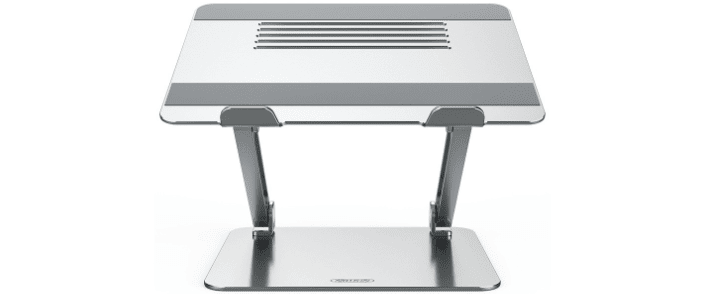
- Independent height and tilt adjustment
- Suited to both seated and standing-desk use
- Sturdy, well-built construction
- Likely priced higher than the more basic stands on this list
The Nillkin ProDesk is a sturdy, well-built stand designed to adjust to a wide range of working postures. You can independently tune both height and tilt, so it works whether you need it tall for standing-desk sessions or reclined for a more relaxed setup — a broader range of adjustment than the fixed-angle stands elsewhere on this list.
That flexibility likely comes at a higher price point than the more basic entries here, though the exact figure isn't listed. If height and tilt independence matters more to you than pure portability, it's worth comparing directly against the Nexstand K2 or True Vision riser above, both of which prioritize portability over this level of adjustment range.
Who should buy it: desk-bound users who want independent height and tilt control for both sitting and standing use. Verdict: the most flexible fixed-desk stand on this list — confirm the price before comparing it against the more portable options.
6. Monsy Laptop Stand

- Aluminum alloy body
- Adjustable width with silicone pads
- Ventilated, anti-overheating design
- Positioned as this list's straightforward value pick
- Fewer named premium features than the Nillkin ProDesk or UGreen X-Kit
The Monsy Laptop Stand is built around straightforward value: an aluminum alloy body for durability, adjustable widths, and handy silicone pads to keep your laptop from sliding. It's genuinely portable and, like the True Vision riser above, helps prevent overheating through its open design.
It doesn't chase the extra features found on the UGreen X-Kit's built-in ports or the Nillkin ProDesk's independent tilt adjustment, but it covers the fundamentals reliably. For anyone who wants a no-frills stand that gets the job done at school or work without extras, this is the straightforward pick on this list.
Who should buy it: budget-focused buyers who want core stability and ventilation without paying for extras they won't use. Verdict: the no-frills value pick on this list — confirm the price against the feature-richer options before deciding.
7. Griffin Elevator Laptop Stand

- Raises screen a full 5.5 inches
- Fixes unflattering webcam angles
- Folds flat, travel-friendly
- Improves airflow underneath the laptop
- Typing on the built-in keyboard becomes awkward at this height
The Griffin Elevator Laptop Stand is built around a specific problem: unflattering webcam angles during video calls. Its 5.5-inch lift is the tallest confirmed elevation on this entire list, well above the 2-3 inches the MOFT adds — enough to genuinely fix the "looking up your nostrils" webcam problem most laptop-mounted cameras create.
The trade-off, honestly stated in the original write-up, is that typing on the built-in keyboard gets awkward at that height — plan on pairing it with a wireless keyboard and mouse, similar to the setup consideration that applies to any stand with a significant lift. Despite its height, it folds up compact and lightweight enough for a bag, and the improved airflow underneath helps prevent overheating during longer sessions.
Who should buy it: anyone whose primary goal is fixing video call angles and who's willing to add a separate keyboard and mouse. Verdict: the video-call specialist on this list — budget for peripherals alongside it.
8. Wanderskye Laptop Sleeve with Stand

- Doubles as both a protective sleeve and a stand
- Water-resistant materials
- Lightweight and portable
- Replaces a separate bag and stand purchase
- Likely fewer adjustment options than a dedicated stand
The Wanderskye Laptop Sleeve with Stand solves two problems at once: it protects your laptop in transit and transforms into a stand once you're ready to work. That two-in-one design is unique on this entire list — every other entry here is either purely a stand or, in the MOFT's case, an adhesive accessory, not something that also replaces a laptop bag.
The lightweight, portable design makes it easy to toss in a bag, and water-resistant materials protect against spills and unexpected rain — a genuine practical advantage for anyone commuting in the Philippines' rainy season. As a trade-off for the dual-purpose design, it likely won't match the height range or adjustability of a dedicated stand like the Nillkin ProDesk or Nexstand K2 elsewhere on this list.
Who should buy it: students, freelancers, and professionals who want to consolidate their laptop bag and stand into one purchase. Verdict: the only true 2-in-1 on this list — a genuine convenience if you're buying a sleeve anyway.
9. UGreen X-Kit

- Built-in USB-C hub with USB-A, HDMI, SD/TF slots
- Four adjustable heights
- Fits 11 to 17-inch laptops
- Eliminates the need for separate adapters
- Likely priced higher given the built-in port hub
The UGreen X-Kit stands apart from every other entry on this list: it's not just a stand, but a connectivity hub built directly into the frame. A USB-C hub with two extra USB-A ports, an HDMI slot, and SD and TF card reader slots means you can skip carrying separate adapters, a genuine convenience none of the other nine entries here offer.
Its folding design adjusts to four different heights, and UGreen states compatibility from ultra-portable 11-inch laptops up to 17-inch gaming machines — a wider confirmed size range than most other entries on this list state. If you regularly need to plug in an external monitor, drive, or card reader at your desk, this is the only stand here that handles that without extra cables.
Who should buy it: anyone who regularly connects external displays, drives, or card readers and wants that built into their stand. Verdict: the connectivity specialist on this list — a real 2-in-1 for anyone who needs the ports.
10. Lention Laptop Stand

- Smooth, tool-free height adjustment
- Aluminum-and-rubber build
- Fits 11 to 17-inch laptops, including MacBooks
- Protective bottom layer
- Adjustment range (0.36 to 1.2 inches) is smaller than several other entries on this list
The Lention Laptop Stand takes the fiddling out of height adjustment with a smooth, tool-free mechanism — just lift or lower to find your angle, within a 0.36 to 1.2-inch range. That range is notably smaller than the Griffin Elevator's 5.5-inch lift or the MOFT's 2-3 inches elsewhere on this list, positioning it as more of a subtle ergonomic nudge than a dramatic elevation.
A soft, protective layer at the bottom keeps your laptop secure and scratch-free, and the aluminum-and-rubber construction balances a modern look with durability. It's explicitly designed to complement MacBooks specifically, alongside broad compatibility from 11 to 17-inch machines, matching the UGreen X-Kit's size range above.
Who should buy it: MacBook users who want a subtle, easy-to-adjust height boost rather than a dramatic elevation. Verdict: a smooth, MacBook-friendly stand — check the Griffin Elevator above if you specifically want a bigger height jump.
FAQs
Why do I need a laptop stand?
A laptop stand is essential for several reasons. Firstly, it helps improve your posture by elevating the screen to eye level, reducing strain on your neck and shoulders. Additionally, it enhances airflow around your laptop, preventing overheating. Lastly, a laptop stand optimizes your workspace, creating a more comfortable and organized environment.
Why doesn't this article list any prices?
The original source material didn't include them — every entry just links out to "Check on Lazada/Shopee." We didn't fill in guessed prices, since we have no reliable way to confirm them from here. Pull the actual price from each listing before publishing.
Are laptop stands adjustable to different heights?
Yes, many laptop stands come with adjustable height settings to accommodate various preferences. This feature allows you to customize the viewing angle and find the most comfortable position for your work or study needs. Adjustable laptop stands are particularly beneficial for preventing discomfort during extended usage — though the actual range varies significantly, from the Lention's subtle 0.36–1.2 inches up to the Griffin Elevator's dramatic 5.5-inch lift.
Are laptop stands portable?
Most are, though portability varies. The MOFT and Nexstand K2 on this list are built specifically for travel — the MOFT sticks to your laptop directly, adding essentially no bulk, while the Nexstand K2 folds down to under a pound. Desk-permanent options like the Nillkin ProDesk trade some portability for a wider adjustment range.
Can I use a laptop stand with any laptop model?
In general, laptop stands are versatile and compatible with various laptop models, including different sizes and brands. However, it's advisable to check the stand's specifications to ensure it can support the weight and dimensions of your specific laptop. Many stands offer a universal fit, but it's always wise to confirm before making a purchase — especially since not every entry on this list states a specific weight capacity.
Do laptop stands require assembly?
The assembly requirements for laptop stands vary. While some stands come fully assembled and ready to use, others may require minor setup. Check the product description or user manual for information on assembly. Typically, the assembly process is straightforward and may involve unfolding, adjusting height settings, or attaching additional components, if any.
Conclusion
Investing in a good laptop stand might seem like a minor decision, but it can really boost your comfort and how productive you are at your workspace. If you want the most versatile and independently verified pick, the Nexstand K2's confirmed specs make it the safest choice; if you travel constantly and want zero added bulk, the MOFT is the clear standout; and if you need built-in connectivity, the UGreen X-Kit is the only entry on this list that doubles as a port hub. Whether you're all about flexibility, easy carrying, or sturdiness, these top 10 laptop stands have got you covered — just confirm the current price on Lazada or Shopee before buying, since none is listed here.
Disclosure: This article contains affiliate links. If you buy through them, NoypiGeek may earn a small commission at no extra cost to you. This doesn't affect which products we recommend or how we rank them.





0 Comments