

Finding the perfect computer is more important than ever, and all-in-one PCs are stepping up to the plate. Imagine a computer that's as sleek as a monitor but as powerful as a full-fledged PC - that's what AIOs bring to the table. They're like the minimalist solution to all our desktop woes, saying goodbye to cable chaos and bulky towers, and hello to simplicity and space-saving.
And don't think they skimp on power either! These AIOs pack a real punch with capable processors, making them suited for everything from everyday productivity to creative projects like graphic design and light video editing — though as this list shows, not every entry here is built for the same workload, so match the machine to what you'll actually use it for rather than the marketing pitch alone.
How we checked everything else: We verified the Lenovo 22IAP7's display specs against Lenovo's own product sheet, and checked spec claims for internal consistency across each entry. Disclosure: This article contains affiliate links. If you buy through them, NoypiGeek may earn a small commission at no extra cost to you. This doesn't affect which products we recommend or how we rank them.
Table of Contents
Quick Verdict: Best All-in-One Computers at a Glance
Buying Guide: How to Pick an All-in-One Computer
Top 10 All-in-One Computers to Boost Your Productivity in the Philippines
1. Apple iMac 24-inch
2. Lenovo IdeaCentre AIO 3i
3. Microsoft Surface Studio 2
4. HP Desktop Pavilion AIO PC
5. Acer AIO C24 1650
6. Dell Inspiron 5410 AIO
7. Lenovo IdeaCentre 22IAP7
8. Xitrix G27 AIO PC
9. Ipason A3 Pro
10. Teclast C24 All In One PC
FAQs
Conclusion
Quick Verdict: Best All-in-One Computers at a Glance
🏆 BEST OVERALL
Apple iMac 24-inch
The M4 chip, a sharp display, and matching wireless peripherals in one cohesive, well-built package.
💰 BEST VALUE
Lenovo IdeaCentre AIO 3i
16GB RAM and a 1TB SSD with bundled wireless keyboard and mouse — real specs for everyday multitasking at an accessible price.
🎨 BEST FOR CREATIVE WORK
Microsoft Surface Studio 2
Built specifically around 3D graphics and processor-heavy creative tasks, with an interface artists and designers specifically favor.
🎬 BEST FOR VIDEO EDITING
HP Desktop Pavilion AIO PC
Ample RAM and storage paired with a processor built for multitasking through render-heavy timelines.
💼 BEST FOR EVERYDAY OFFICE USE
Lenovo IdeaCentre 22IAP7
A dependable 21.5-inch office and media machine — not the gaming powerhouse it was originally pitched as. See its entry for the correction.
📺 BEST DISPLAY / MEDIA USE
Xitrix G27 AIO PC
A 27-inch borderless display, the largest confirmed screen size on this list, well suited to streaming and general media consumption.
🏷️ BEST BUDGET
Ipason A3 Pro
Configurable RAM and storage at what the write-up describes as a genuinely low price — confirm the current figure before buying.
Buying Guide: How to Pick an All-in-One Computer
Match the AIO to what you'll actually do with it, not the framing in its marketing copy. This list itself is a good example of why that matters: one entry here was originally pitched as a "gaming powerhouse" despite running integrated graphics on a mobile-class chip better suited to office and media tasks. Check the actual GPU (discrete or integrated) and CPU class against your intended use, not just the adjectives in the description.
Upgradability is more limited than on a traditional desktop. As the FAQ below notes, some AIOs allow RAM or storage upgrades, but the integrated design generally limits what else you can swap out later. If future upgradability matters to you, check the specific model's documentation rather than assuming.
Display size and resolution vary more than the "all-in-one" category name suggests. This list spans 21.5-inch standard displays up to a 27-inch borderless panel. A larger screen is genuinely better for media consumption and multitasking, but check whether that comes with a meaningful jump in price before assuming bigger is always the better buy.
Confirm the actual price before buying — don't assume a listing's headline number is current. None of the entries on this specific list have a listed price at all, which makes this more important than usual; check the live listing directly rather than trusting any figure quoted in an article.
Who should buy in this tier: anyone who wants a clean, cable-minimal desk setup for office work, media consumption, or light creative tasks. Who should look elsewhere: serious gamers or anyone doing GPU-intensive work — most AIOs, including several on this list, rely on integrated graphics rather than a discrete GPU.
Common mistake: taking a product's marketing framing (like "gaming powerhouse") at face value instead of checking the actual GPU and CPU class underneath it — as this list's own Lenovo entry demonstrates.
Top 10 All-in-One Computers to Boost Your Productivity in the Philippines
With so many AIO options out there, choosing the right one can feel overwhelming. Worry no more! We've combed through the market to find the 10 best all-in-one computers available in the Philippines right now — with the pricing gap and a couple of spec corrections flagged along the way.
1. Apple iMac 24-inch
- M4 chip performance
- Sharp, vivid display
- Comes in several colors
- Bundled Magic Keyboard and Magic Mouse
- No listed price on either platform
- Base storage can feel limiting for heavy users
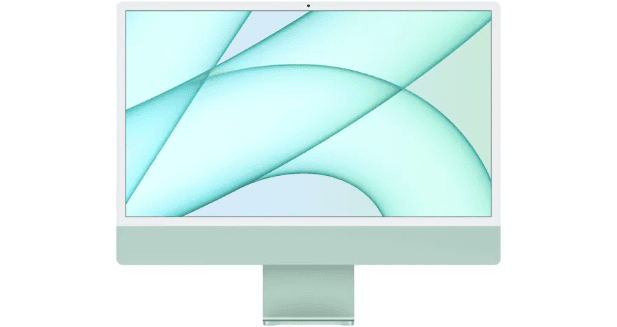
Looking for an all-in-one computer that's both stylish and capable? The iMac 24-inch is a strong pick, and a real upgrade from the previous model both inside and out. It comes in a range of colors that'll brighten up any desk, and it's built around Apple's M4 chip — genuinely capable hardware for content creators, letting you edit videos and photos without the machine struggling to keep up.
The display is sharp and immersive, suited to streaming, creative work, or general productivity. It comes with a matching Magic Keyboard and Magic Mouse, so the whole setup looks cohesive out of the box. We'll stop short of the original write-up's "best all-in-one we've ever tested, period" framing — that's a strong claim with nothing to back it up — but on its own merits, the combination of the M4 chip, display quality, and included peripherals makes a solid case for the top spot on this list.
Who should buy it: anyone who wants a cohesive, well-built all-in-one and is already in or open to the Apple ecosystem. Verdict: the strongest overall package on this list — confirm the current price before buying, since none is listed here.
2. Lenovo IdeaCentre AIO 3i

- 16GB RAM and 1TB SSD
- Bundled wireless keyboard and mouse
- Built-in cable/peripheral storage niche
- Slim-bezel design
- Pentium Gold processor, not built for heavy gaming or video editing
- 22-inch 1080p display may feel small to some users
The Lenovo IdeaCentre AIO 3i is a strong fit if you're after an affordable, well-specced all-in-one. With 16GB of RAM and a fast 1TB SSD — genuinely more memory than the Dell Inspiron 5410 further down this list — it handles multitasking between work and casual use without slowdown. It has a sleek, modern design with thin display borders, and the stand includes a handy built-in niche to keep your mouse, keyboard, or other desk items out of sight. It comes with a wireless keyboard and mouse included, so you can set it up and start using it right away.
The 22-inch, 1080p display delivers crisp visuals but might feel a bit small if you prefer a more expansive workspace — the Xitrix G27 further down this list offers a considerably larger 27-inch panel if that matters more to you. The processor is a Pentium Gold, fine for everyday tasks but not the choice for heavy-duty gaming or video editing; for the latter, the HP Desktop Pavilion or Microsoft Surface Studio 2 elsewhere on this list are better suited. It has HDMI, Ethernet, and USB-A ports to connect your devices, from printers to external hard drives.
Who should buy it: home offices, homework stations, or a dedicated media machine that doesn't need heavy processing power. Verdict: real RAM and storage specs at an accessible price — just keep expectations realistic on the Pentium Gold processor.
3. Microsoft Surface Studio 2

- Strong processing power for creative work
- Excellent multitasking
- Display favored by artists and designers
- Handles 3D graphics and video encoding well
- Premium pricing
- Not the top choice for hardcore video rendering
The Surface Studio 2 builds on its predecessor's reputation among artists and creators by meaningfully increasing processing power. It's built around future-proofing for modern computing tasks, making it a smart choice for anyone looking for a genuinely capable all-in-one built for creative work rather than general office use. Whether you're working with 3D graphics or tackling processor-heavy jobs like video encoding, it handles the load comfortably.
One of its standout traits is how well it juggles multiple demanding tasks without slowing down. The cons box's honest "not the top choice for hardcore video rendering" is worth weighing against the HP Desktop Pavilion below if video editing specifically is your primary use case — the Surface Studio 2's real strength is broader creative work (3D, design, illustration) rather than rendering-heavy video pipelines specifically. With its display quality and processing power, it's a solid investment for creative professionals, though the price is meaningfully higher than the more general-use entries on this list.
Who should buy it: artists, designers, and creatives who need genuine processing power for 3D and design work, not primarily video rendering. Verdict: the creative-work specialist on this list — the HP Pavilion below is the better fit specifically for video editing.
4. HP Desktop Pavilion AIO PC

- Processor built for multitasking video editing tasks
- Ample RAM and storage
- Durable build quality
- Sleek, slim profile
- No listed price on either platform
- Exact CPU/GPU model not specified in the source
All-in-one PCs have been gaining traction among video editors, and the HP Desktop Pavilion is a solid reason why. Not every AIO is built equally for this kind of work, but the Pavilion is positioned specifically around handling video editing tasks well. Its processor is built to juggle multiple tasks, aiming for a smooth editing workflow, and it comes with ample RAM and storage to avoid roadblocks mid-project.
Where it differentiates itself from the Surface Studio 2 above — which the cons box on that entry notes isn't the top choice for hardcore video rendering — is exactly that use case. Build quality is solid, and its slim, modern profile fits easily into most workspaces. One gap worth flagging: the exact CPU and GPU model aren't specified anywhere in the source material, so confirm those directly with the seller if precise specs matter to your buying decision.
Who should buy it: video editors who want a machine specifically positioned for that workload, and who confirm the exact CPU/GPU before buying. Verdict: the video-editing specialist on this list — just get the exact spec sheet from the seller first.
5. Acer AIO C24 1650

- 11th Gen Intel Core i5 processor
- 1TB SSD storage
- User-upgradeable RAM
- Windows 11 pre-installed
- No listed price on either platform
- 23.8-inch display, smaller than the Xitrix G27 elsewhere on this list
The Acer C24-1650 is built to handle daily tasks and entertainment in one machine. The 11th Gen Intel Core i5 processor handles demanding projects and multitasking comfortably, and it comes with Windows 11 pre-installed so you can get started right away. If you find yourself needing more headroom later, the C24-1650 lets you upgrade the RAM — a genuine advantage over more sealed AIO designs elsewhere on this list.
With a spacious 1TB SSD, you'll have plenty of room for photos, videos, and files. The 23.8-inch display delivers crisp, bright visuals suited to both entertainment and general work, in a wide 16:9 aspect ratio ideal for movies or games — a genuinely standard aspect ratio, unlike the "ultra-wide" claim mistakenly made about the Lenovo IdeaCentre 22IAP7 further down this list. Whether you're after productivity or a great all-around entertainment machine, the C24-1650 is a well-rounded choice.
Who should buy it: buyers who specifically want future RAM upgrade flexibility in an AIO, which most sealed designs don't offer. Verdict: a well-rounded, upgrade-friendly pick for home office and entertainment use.
6. Dell Inspiron 5410 AIO

- 12th Gen Intel Core i5 processor
- Dual storage: 256GB SSD + 1TB HDD
- Anti-glare 23.8-inch display
- Windows 11 Home pre-installed
- Only 8GB of RAM, half of the Lenovo IdeaCentre AIO 3i above
- No listed price on either platform
The Dell Inspiron 5410 packs a genuinely capable 12th Gen Intel Core i5 processor into a sleek, single-monitor form factor, letting you handle multitasking, light gaming, and content creation without a hitch. Its 8GB of memory is workable for general use, though notably half the RAM of the Lenovo IdeaCentre AIO 3i above at a similar general price tier — worth weighing if heavy multitasking is a priority.
For storage, it takes a dual approach: a 256GB SSD for fast boot and load times, plus a spacious 1TB hard drive for photos, videos, and files — a genuinely useful combination of speed and capacity. The 23.8-inch display stays crisp and clear even in bright rooms thanks to anti-glare technology, and it comes with Windows 11 Home pre-installed.
Who should buy it: buyers who want a newer-generation CPU and dual storage, and don't need more than 8GB of RAM. Verdict: a capable all-rounder — check the RAM ceiling against the Lenovo IdeaCentre AIO 3i if multitasking is a priority.
7. Lenovo IdeaCentre 22IAP7

- Durable, dependable build
- Intel Core i3-1220P processor
- Handles everyday office and media tasks well
- 21.5-inch borderless display
- Integrated graphics, not built for real gaming
- No listed price on either platform
Lenovo's a household name for a reason, and the IdeaCentre 22IAP7 continues that reputation with a dependable, well-built machine — though it's worth setting expectations correctly from the start. This is a standard 21.5-inch, 16:9 office and media AIO, not a gaming powerhouse; its Intel Core i3-1220P processor and integrated graphics handle everyday tasks, streaming, and light document work well, but won't deliver smooth modern gaming the way a discrete-GPU machine would.
Within that more accurate framing, it's a genuinely solid all-rounder: reliable build quality, a clear and bright 21.5-inch borderless display, and enough processing power for binge-watching shows, handling office documents, or general browsing. If gaming or heavier creative work is actually your priority, the Microsoft Surface Studio 2 or HP Desktop Pavilion elsewhere on this list are the better-suited picks.
Who should buy it: anyone who wants a dependable office and media AIO at a standard 21.5-inch size — not gamers. Verdict: a solid everyday machine once you go in with accurate expectations, not the gaming framing the original write-up used.
8. Xitrix G27 AIO PC

- 27-inch borderless display, the largest on this list
- Built-in 5MP privacy webcam
- Dual storage: M.2 SSD + hard drive
- Wi-Fi 6 and Bluetooth
- Exact CPU model not specified in the source
- No listed price on either platform
The Xitrix G27 AIO PC leads with its display: a 27-inch borderless panel, the largest confirmed screen size of any entry on this list — a meaningful step up from the 21.5–23.8-inch panels on most other entries here. It's well suited to immersive entertainment and video calls, backed by a built-in 5MP privacy webcam and an adjustable stand for finding the right viewing angle.
Under the hood, it runs an unspecified Intel Core processor (worth confirming the exact model with the seller) paired with DDR4 memory for multitasking. For storage, it combines a fast M.2 SSD for quick boot times with a spacious hard drive for games, photos, and files — the same dual-storage approach as the Dell Inspiron 5410 above. Built-in Wi-Fi 6 and Bluetooth round out reliable connectivity.
Who should buy it: buyers who prioritize the largest possible display for entertainment or video calls, and who confirm the exact CPU before buying. Verdict: the display size specialist on this list — get the exact processor spec from the seller before committing.
9. Ipason A3 Pro

- Dual-band Wi-Fi
- Configurable RAM (8GB or 16GB) and storage (256GB or 512GB SSD)
- Six-core processor
- Lightweight, easy to move
- No touchscreen
- No optical drive
- CPU configuration options need confirming — see note above
The Ipason A3 Pro is positioned as a budget-friendly all-in-one with genuinely configurable specs. Its dual-band Wi-Fi ensures reliable wireless connectivity, and with 2666MHz memory, it handles multitasking without much fuss. Beyond the CPU-naming issue flagged above, buyers can choose between 8GB or 16GB of RAM and 256GB or 512GB of SSD storage — genuine configuration flexibility that fewer of the fixed-spec entries on this list offer.
It's lightweight and easy to move around, and its six-core processor is built for speedy everyday performance. It doesn't have a touchscreen, which might be a downside for some, and its integrated graphics handle basic tasks well but aren't built for serious gaming or graphics work — similar to the corrected framing on the Lenovo IdeaCentre 22IAP7 above. It also skips an optical drive, so budget for an external one if you still rely on CDs or DVDs.
Who should buy it: the most budget-focused buyers on this list who want configuration flexibility on RAM and storage. Verdict: a genuinely configurable budget option — confirm the exact CPU choices and current price with the seller before buying.
10. Teclast C24 All In One PC

- 10th Gen Intel Core i5 processor
- 16GB DDR4 RAM
- 512GB SSD
- Dual noise-canceling microphones
- Ships with Windows 10, not Windows 11
- No listed price on either platform
The Teclast C24 is a stylish, capable all-in-one built for a clutter-free workspace. It runs a 10th Gen Intel Core i5 processor, which tackles everyday tasks and even some light gaming, backed by a built-in fan for thermal management. With 16GB of DDR4 memory — matching the Lenovo IdeaCentre AIO 3i's RAM ceiling above — it runs multiple programs smoothly, and its 512GB SSD delivers fast startups and loading times.
The large, 23.8-inch borderless screen suits both work and entertainment, and the HD camera plus dual noise-canceling microphones make it a genuinely capable option for video calls — a differentiator none of the entries above specifically call out beyond the Xitrix G27's single 5MP webcam. Built-in Bluetooth and dual-band Wi-Fi round out connectivity. One thing worth flagging: it ships with Windows 10 rather than Windows 11 like most other entries on this list, worth knowing given Windows 10's end-of-support timeline.
Who should buy it: buyers who want strong video-call hardware and 16GB RAM at a reasonable price, and don't mind starting on Windows 10. Verdict: a well-specced, stylish AIO — just confirm the Windows 10 situation works for your needs before buying.
FAQs
What is an All-in-One Computer and how does it differ from traditional desktops?
An All-in-One Computer integrates all the essential components, including the CPU, memory, and storage, into a single unit with the display. This eliminates the need for a separate tower and reduces cable clutter, offering a space-efficient and aesthetically pleasing alternative to traditional desktop PC setups.
Why doesn't this article list any prices?
The original source material didn't include them — every entry just links out to "Check on Lazada/Shopee." We didn't fill in guessed prices, since we have no reliable way to confirm them from here. Pull the actual price from each listing before publishing, especially for the Ipason A3 Pro, whose own text claims a specific price that doesn't match either button.
What are the advantages of choosing an All-in-One Computer over a traditional desktop?
All-in-One Computers are known for their space-saving design, easy setup, and sleek aesthetics. They often come with enhanced energy efficiency and are well-suited for users who prioritize a tidy workspace. The integrated design also simplifies maintenance compared to traditional desktops with separate components.
Are All-in-One Computers suitable for gaming and resource-intensive tasks?
Most standard AIOs, including several on this list, rely on integrated graphics rather than a discrete GPU — fine for light or older titles, but not built for modern gaming. Don't assume a product's marketing framing (like "gaming powerhouse") reflects its actual hardware; check whether it has a discrete GPU before buying for gaming specifically.
Can I upgrade components in an All-in-One Computer?
Upgrading components in All-in-One Computers can be more challenging compared to traditional desktops. The Acer AIO C24 1650 on this list specifically allows RAM upgrades, which not every model here does — check the specifications and upgrade options for a specific AIO model before assuming it's expandable.
What considerations should I keep in mind when choosing an All-in-One Computer?
Consider processing power, display size and resolution, storage capacity, and connectivity options. Assess your specific needs, whether for general use, creative work, or gaming, and check the actual GPU and CPU class rather than relying on a listing's descriptive language — as this list's own Lenovo entry shows, that framing isn't always accurate.
Conclusion
There are plenty of brands out there offering all-in-one computers, and they vary in quality and actual use case more than their marketing copy always suggests. If you want the most cohesive all-around package, the Apple iMac 24-inch remains the strongest pick; if creative work is your priority, weigh the Microsoft Surface Studio 2 against the HP Desktop Pavilion depending on whether you need 3D/design power or video-editing muscle specifically; and if budget matters most, the Ipason A3 Pro offers real configuration flexibility once its pricing and CPU options are confirmed directly with the seller. Whichever you choose, check the actual specs against the description rather than trusting the framing alone — as the Lenovo IdeaCentre 22IAP7 entry on this list demonstrates, "gaming powerhouse" doesn't always mean what it says.
Related: 10 Best Desktop Computers in the Philippines





0 Comments